7 Best InVideo AI Alternatives for Content Creators
 Written By John Ravi15 min read
Short answer: Of the InVideo AI alternatives available in November 2026, Vidpal is the best fit for most content creators. Each Short costs one credit, so 30 Shorts a month fit the $39 Pro plan, which also schedules posts to Instagram, TikTok, YouTube and LinkedIn. Choose Revid.ai for generated motion with auto-posting, CapCut for free manual editing and HeyGen for avatars.
- InVideo AI is now a credit-based "agentic video editor" that does not post or schedule.
- Vidpal covers script, voice, visuals, captions, clipping and publishing at about $0.98 a video on Pro.
- Vidpal has no avatars or generated video clips; HeyGen and Revid.ai do.
If you run a blog, a small online shop or a faceless channel and have been making videos in InVideo AI, you have probably noticed the product changing. It is now sold as an "agentic video editor" built on credits and third-party video models, and the old one-prompt flow sits behind an "Older versions" button. That is why so many creators are searching for InVideo AI alternatives: they want a predictable cost per video and a tool that gets it posted.
This guide is for creators and small-business marketers who post vertical videos to YouTube Shorts, Instagram Reels and TikTok. Each tool was assessed from its own website (pricing, features and help center) as of 6 November 2026 and judged on cost per finished Short, inputs, voice and captions, visuals, and publishing. Prices are in US dollars as of November 2026. If your main goal is turning articles into clips, see our guide to AI tools that convert blog posts into videos.

Why creators look for InVideo AI alternatives
Creators usually leave InVideo AI for one of four reasons, each visible on InVideo's own pages as of 6 November 2026.
- Generated footage uses credits fast. InVideo's pricing page lists Seedance 2.5 at about 56 credits per 5 seconds of 720p video. Starter's 400 monthly credits buy roughly 35 seconds of it.
- Credits reset monthly. Unused plan credits do not roll over, and InVideo reserves "the right to update credit costs at any time, without prior notice."
- Nothing gets posted for you. Its guide to Reels and Shorts from your footage says "invideo does not post or schedule" and suggests Buffer or Later.
- No obvious entry point. The pricing page shows no free plan.
InVideo AI still does plenty well. Downloads and edits cost no credits, the editor is a real multitrack timeline, and it runs Seedance, Veo 3.1 and Kling. It also works from ChatGPT through a plugin and from Claude through an MCP server (Model Context Protocol, an open standard that lets an AI assistant use outside apps). For premium generated footage on a timeline you control, it is still solid.
How we compared the alternatives
We judged each tool on what matters to someone posting several Shorts a week: cost per finished Short on the cheapest plan that covers 30 a month; inputs (topic, script, web page or your own footage); voice and captions; visuals (stock, AI images, generated clips or avatars); and publishing. Auto-publishing means the tool posts a finished video to your connected accounts, now or on a schedule, without you downloading and re-uploading it.
The seven alternatives side by side
| Tool | Best for | Price from (monthly / billed yearly) | Free plan | Starts from | Visuals | Publishing |
|---|---|---|---|---|---|---|
| Vidpal | Faceless Shorts and Reels, end to end | $19 / $12 per month | 4 one-time credits, watermark | Topic, script, URL, own footage, long recordings | Stock clips, AI images with motion, gameplay loops | Instagram, TikTok, YouTube, LinkedIn (Pro, Business) |
| Revid.ai | Generated short-form video with auto-posting | $39 / $32 per month (Growth) | No; trial credits on sign-up | Prompt, script, links, long video | Generated video, images, avatars | TikTok, Instagram, YouTube, X (all paid plans) |
| CapCut | Free manual editing on phone and desktop | $19.99 / $15.00 per month (Pro) | Yes, basic tools | Your footage, templates, prompts | Your footage, templates, Seedance clips | Share to TikTok |
| Fliki | Voice-led videos in many languages | $28 / $21 per month | 3 credits a month, 720p, watermark | Idea, script, blog post, slide deck | Stock, AI media, avatars | YouTube (paid plans) |
| HeyGen | Talking AI avatars and translation | $29 / $24 per month | 3 watermarked 1-minute videos a month | Script, prompt, photo or footage for avatars | Avatars; generated clips on Pro | None found |
| Canva | Template videos alongside other designs | $18 / $12 per month (Pro) | Yes; watermark only on paid elements | Templates, uploads, prompts | Templates, 8-second AI clips | Direct share; scheduling on Pro |
| Pictory | Longer narrated stock-footage videos | $29 / $25 per month | No; 14-day trial | Script, URL, document, slides, recording | Getty and Storyblocks stock, avatars | Download or share link |
Figures from each company's pricing page as of 6 November 2026; plans change often.
The seven picks, ranked for content creators
1. Vidpal: best overall InVideo AI replacement for Shorts and Reels
Vidpal is an AI content engine built around short-form video, and it replaces what most creators used InVideo AI for: type an idea, get a finished vertical video. In Studio you start from a topic, a full script or a web page URL. Vidpal drafts the script, lets you edit it, voices it, adds visuals and captions, and renders a 9:16 Short of 30 to 90 seconds. Paid plans also make 16:9 videos of 1 to 10 minutes.
- Best for: creators and small businesses posting faceless videos (narration over visuals, nobody on camera) several times a week.
- Price: Free (4 one-time credits, watermark); Starter $19/month or $12 billed yearly for 15 credits; Pro $39 or $23 yearly for 40; Business $69 or $41 yearly for 100. See Vidpal's pricing page.
- Watch out for: no talking avatars, no voice cloning, and its AI visuals are stills with camera motion, not generated video.
The pricing model is the main reason to switch. One credit makes one Short, Reel or TikTok, so on Pro billed monthly each video costs about $0.98. Publishing costs no credits: on Pro and Business you connect Instagram, TikTok, YouTube and LinkedIn once, then post now or schedule up to 90 days ahead with the Vidpal Social Scheduler.
Three more parts matter if you are leaving InVideo. Auto Reels, described on the AI Reels generator page, takes your topics or RSS feeds, finds real stories, writes a script, drafts several hooks and keeps the strongest, then renders a captioned Reel twice a day on Pro, posting it if you allow. AI Clips turns a recording of up to 2 hours into ranked Shorts, each with a virality score, a 0-100 rating of that moment against the rest of the same video. AI Editing cleans up your own footage with silence removal, auto zooms, automatic b-roll (stock footage cut over your main shot) and a 16:9 to 9:16 reframe. Pair AI Clips with one of our free webinar recording tools and each webinar becomes a batch of Shorts.
Vidpal's team has published one test. From 16 September to 5 October 2026 it posted 38 Studio-made Shorts on seven test channels and got 13,538 public views, a median of 36.5 per Short, with one 15-subscriber channel producing 81% of them. Read Vidpal's 38-Short case study as proof that faceless AI Shorts can find viewers, not as a forecast: results were uneven and depended on niche and packaging.
2. Revid.ai: best for generated footage with auto-posting
Revid.ai is the closest swap if you liked InVideo's generation models but want posting built in. It turns an idea, script, link or viral video into a short clip and publishes to TikTok, Instagram, YouTube and X, now or scheduled, on every paid plan.
- Best for: faceless channels that want generated motion and daily automation.
- Price: no free plan (trial credits on sign-up); Growth $39/month or $32 yearly for 2,000 credits; Elite $89 for 5,000; Ultra $199 for 12,000.
- Watch out for: a video's credit cost depends heavily on the model, and plan credits do not roll over.
Revid's pricing page and credit guide put a typical 30-second video with its Pro moving images at 40 to 80 credits, and Veo 3 at 100 credits per 5 seconds. Auto-Mode "workers" can generate and post daily. Against Vidpal, Revid gives you real generated motion; Vidpal gives you a flat price per Short, scored clips from long videos and LinkedIn publishing.
3. CapCut: best free editor for creators who cut their own footage
CapCut is a template-driven editor on phone, desktop and web, and the right pick if you film yourself and want to control every cut. It has auto captions, text to speech, transcript editing that flags filler words, and paid AI video generation with Seedance models.
- Best for: beginners and TikTok-first creators who enjoy editing.
- Price: Free; Pro $19.99/month or $179.99/year with 1,200 monthly AI credits; Ultra $79/month. CapCut's pricing page calls prices "for reference only".
- Watch out for: its Materials License Agreement (updated 22 January 2026) limits commercial use of some templates and sounds.
CapCut will not write, voice and assemble a video from a topic; you are the editor. For a business account, check licensing before posting: an export mixing non-commercial and commercial materials counts as personal use only. CapCut says Pro's credits stretch to about 240 seconds of 720p Seedance 2.0 Mini video.
4. Fliki: best for voiceover-led videos in many languages
Fliki starts from text (an idea, a script, a blog post or a slide deck) and returns a narrated video built on stock or AI visuals. Its strength is the voice library: 2,000+ voices in 80+ languages and 100+ dialects.
- Best for: explainers where narration carries the message, especially in several languages.
- Price: Free (3 credits a month, 720p, watermark); Standard $28/month or $21 yearly for 180 credits; Premium $88 or $66 yearly for 600.
- Watch out for: editing a scene's voiceover text charges that scene's audio again.
The Fliki pricing page FAQ says Standard's 180 credits make roughly 60 to 90 minutes of finished video, and paid plans include YouTube publishing. Choose Fliki over Vidpal for a cloned voice or non-English narration. Vidpal's Studio captions are English, though its editor's Translate panel can translate captions and dub the voice into eight languages.
5. HeyGen: best for talking AI avatars
If your InVideo videos relied on avatars or "AI twins", HeyGen is the specialist: stock and custom avatars, a Video Agent that builds videos from a prompt, its own text-to-speech and 175+ languages on paid plans.
- Best for: creators, educators and marketers who want a presenter without filming.
- Price: Free (3 watermarked videos a month, up to 1 minute); Creator $29/month or $24 yearly for 600 credits; Pro $49 or $41 yearly with 4K export.
- Watch out for: credit use per video varies by model and length, and no direct social publishing appears on its pages.
Unused credits roll over one month on monthly billing, per HeyGen's pricing page, and it offers an MCP server for Claude and a ChatGPT plugin. Vidpal has no avatars, so if a face on screen is the point, use HeyGen and keep Vidpal for your faceless Shorts.
6. Canva: best for template videos on a tight budget
Canva is a design platform with a template video editor, auto captions, AI voice and, on paid plans, "Create a Video Clip", powered by Google's Veo-3. If your business already designs its graphics there, video costs nothing extra.
- Best for: marketers making branded videos next to posts, flyers and slides.
- Price: Free; Pro $18/month or $144/year; Business $25 per person per month. See Canva's pricing page.
- Watch out for: AI clips are 16:9, up to eight seconds and limited each month; there is no topic-to-Short automation.
The free plan exports MP4s up to 30 minutes at 1080p, and watermarks appear only when a free account uses paid elements. Pro adds social scheduling. The catch at volume: each video is still assembled by hand.
7. Pictory: best for longer narrated stock-footage videos
Pictory builds narrated, captioned stock-footage videos from a script, a URL, a document, a slide deck or a recording. Script and URL videos can run up to 30 minutes, in 16:9, 9:16 or 1:1.
- Best for: marketers and trainers turning written material into narrated videos.
- Price: no free plan (14-day trial at 720p with branding); Starter $29/month or $25 yearly for up to 30 minutes of video; Professional $59 or $35 yearly for 90 minutes.
- Watch out for: no direct social publishing, no refunds on subscriptions, and projects are deleted when you cancel.
If you need narrated videos longer than 10 minutes, Pictory is the better fit, since Vidpal's 16:9 videos stop there; see Pictory's pricing page. Our guide to the best Pictory alternatives compares it with its own rivals.
What 30 Shorts a month costs on each tool
The cheapest plan that covers 30 Shorts a month costs between $0 and $39 on monthly billing, but only Vidpal and Revid.ai include auto-publishing to several platforms at that price. The table works from published plan allowances and credit rates, assuming 30-to-60-second narrated, captioned Shorts.
| Tool | Plan that covers 30 Shorts | Billed monthly | Billed yearly | Cost per Short (monthly billing) | Posts for you? |
|---|---|---|---|---|---|
| Vidpal | Pro: 40 credits, 1 per Short (10 to spare) | $39 | $23/month | $1.30 (about $0.98 per credit) | Yes: Instagram, TikTok, YouTube, LinkedIn |
| Revid.ai | Growth: 2,000 credits; 30 Shorts at 40-80 credits each need 1,200-2,400 | $39 | $32/month | $1.30, if your Shorts average 66 credits or less | Yes: TikTok, Instagram, YouTube, X |
| Pictory | Starter: up to 30 minutes of video a month | $29 | $25/month | $0.97 for 1-minute videos | No |
| Fliki | Standard: 180 credits, about 60-90 minutes by Fliki's FAQ | $28 | $21/month | $0.93 | YouTube only |
| Canva | Pro: you build each video from templates | $18 | $12/month | $0.60 plus your editing time | Scheduling on Pro |
| CapCut | Free or Pro: you edit each video | $0 or $19.99 | $15/month | $0 to $0.67 plus your editing time | Share to TikTok |
| HeyGen | Creator: 600 credits | $29 | $24/month | Not published (varies by model and length) | None found |
| InVideo AI (for reference) | Starter's 400 credits cover about one fully generated 30-second Short (Seedance 2.5, 720p) | $20 | $10/month | Depends on the assets; not published per video | No |
Figures from each company's pricing page as of 6 November 2026; plans change often.
The lowest prices (Canva and CapCut) assume you do the editing, and for most solo creators time is the scarcer resource. In this 30-Short scenario, Pictory and Fliki cost less per video than Vidpal on monthly billing, but neither posts to Instagram or TikTok, so you would add a scheduler.
Vidpal Pro and Revid.ai Growth are both $39; the difference is predictability, since a Vidpal Short is always one credit. The InVideo row shows why generated footage is costly everywhere: six 5-second Seedance 2.5 segments use about 336 credits. On yearly billing, Vidpal Pro drops to $23 a month, about $0.77 per Short.

How to switch from InVideo AI to Vidpal
You can move a weekly Shorts routine from InVideo AI to Vidpal in an afternoon.
- Download your InVideo videos first. InVideo's help pages say downloading content you already generated costs no credits.
- Move scripts, not projects. Paste the narration of your best videos into Studio's "Full Script" input. For new ideas type a topic; for a blog post, give Studio the URL.
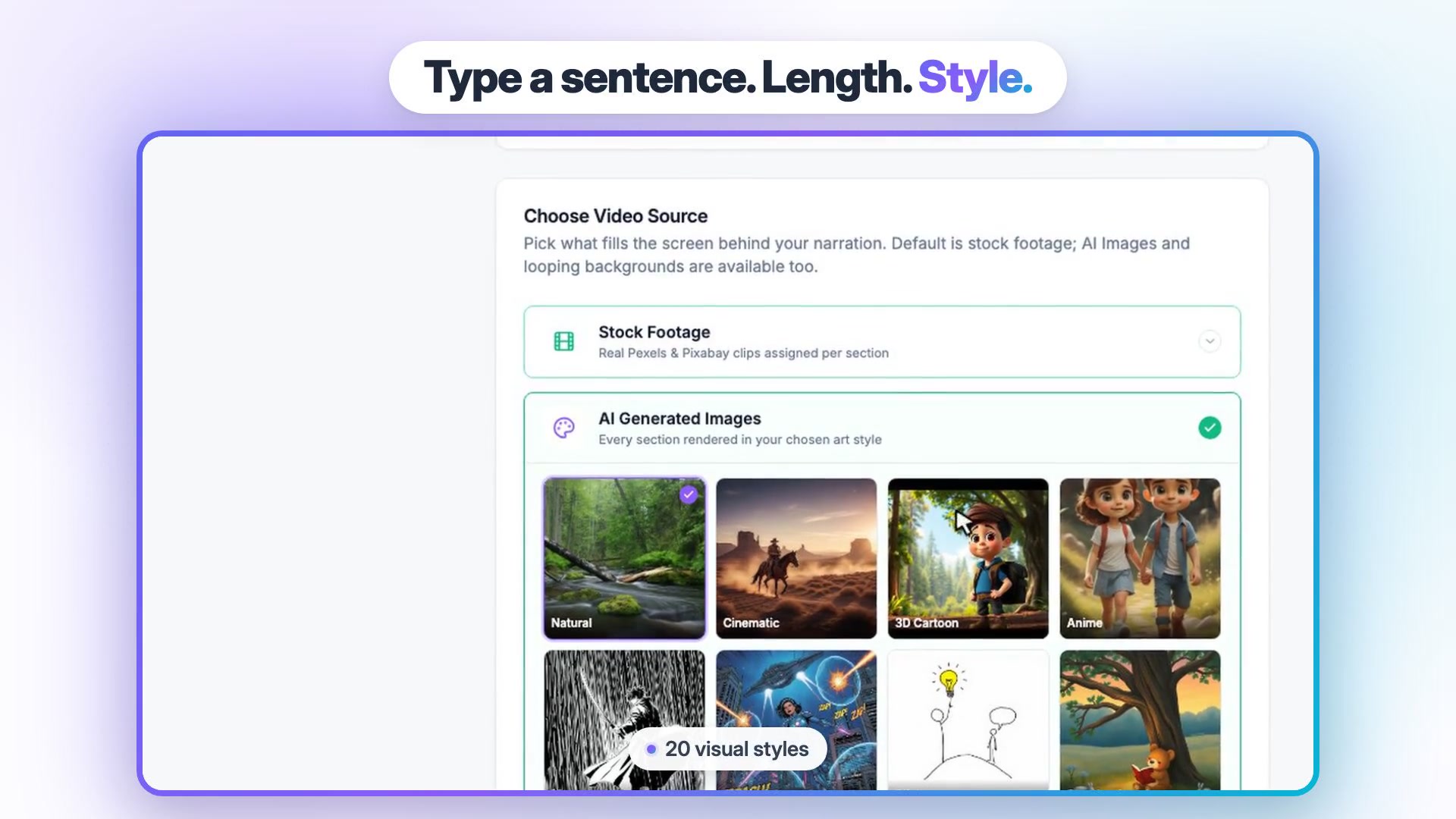
- Match the look. Choose Stock Footage, or switch to AI Generated Images and pick a style such as cinematic, 3D cartoon or stickman (there are 20).
- Set up the Brand Kit once. Add logo, colors, font and caption style in the Vidpal Brand Kit, then choose from 75 caption presets.
- Choose a voice and review. Pick a system voice, edit the script, swap any section's image, then render.
- Connect your accounts. On Pro, link Instagram, TikTok, YouTube and LinkedIn and schedule a week of posts. On Starter, Vidpal copies the caption and opens the platform for a manual post.
- Run both for two weeks, then compare views and time spent before cancelling anything.
Two things do not carry over. An InVideo AI twin or cloned voice has no Vidpal equivalent, so you will use a stock voice. And if your channel depends on Seedance, Veo or Kling footage, keep a generator for those shots; Vidpal's visuals are stock clips, moving stills and an optional five-second AI hook clip (one extra credit). Vidpal's InVideo alternative page lists the differences side by side.
Will AI-made Shorts get your channel in trouble?
Not if each video has a real angle, but sheer volume is a risk. In July 2025 YouTube renamed "repetitious content" to "inauthentic content", and its monetization policy page says content must not be "mass-produced, generic, repetitive, or manipulative". Whatever tool you pick, vary hooks, angles and visuals, and edit every script. YouTube's AI label is needed only for realistic synthetic content, not for AI-written scripts or captions.
Which InVideo AI alternative fits you?
- Several faceless Shorts a week, scheduled for you: Vidpal Pro.
- A few videos a month: Vidpal Starter (15 credits, manual sharing), or Canva free if you prefer designing by hand.
- Generated motion, plus posting to X: Revid.ai.
- You film yourself and like editing: CapCut, adding Vidpal's AI Editing or AI Clips when you want captions, zooms and reframing done for you.
- A presenter on screen: HeyGen.
- Several languages or a cloned voice: Fliki.
- 5-to-30-minute narrated explainers: Pictory.
- A WordPress blog: turn each post into a Short with Studio's URL input and embed it back, keeping the page quick with our WordPress speed guide.
Marketing a local business rather than a channel? Our roundup of AI video tools for small business marketing compares picks by budget.
What to do next
Count last month's Shorts and what each cost in credits and hours, then compare with the table above. If Vidpal fits, create a free Vidpal account and try Auto Reels with the four trial credits (they render with a watermark), then move to Starter when you want to export Studio videos from your own scripts. Our guide on how to get your blog noticed covers where to share the results.
Frequently asked questions
What is the best InVideo AI alternative for content creators?
As of November 2026, Vidpal is the best all-round InVideo AI alternative for creators who post short vertical videos. It writes, voices, illustrates, captions and schedules Shorts and Reels at one credit per video, about $0.98 on the $39 Pro plan. Revid.ai is better for generated motion footage, HeyGen for avatars, and CapCut for free manual editing.
Is there a free alternative to InVideo AI?
CapCut and Canva have free plans that export video, so they are the best free options if you will edit each video yourself. Vidpal's free plan is a trial of 4 one-time credits with a "Made with Vidpal" watermark; Auto Reels render free, but Studio exports need a paid plan. Fliki's free plan gives 3 credits a month at 720p with a watermark.
Is Vidpal cheaper than InVideo AI?
It depends on what you make. InVideo AI Starter costs $20 a month for 400 credits, and a fully generated 30-second clip on Seedance 2.5 at 720p uses about 336 of them. Vidpal charges one credit per Short whatever its style, so 40 Shorts cost $39 on Pro. For stock-based videos, InVideo publishes no per-video cost to compare.
Can Vidpal post to YouTube, Instagram and TikTok automatically?
Yes, on the Pro ($39 a month) and Business ($69 a month) plans. You connect Instagram, TikTok, YouTube and LinkedIn once, then publish a finished video right away or schedule it up to 90 days ahead, and publishing uses no credits. Auto Reels can also post on its own twice a day on Pro. Pinterest, X and Facebook are not supported.
Does Vidpal have AI avatars or voice cloning?
No. As of November 2026 Vidpal has no talking AI avatars, and its voice cloning feature has been retired, so narration uses system voices grouped by language. If you need a presenter on screen, HeyGen or Synthesia is the better choice. For a cloned voice, Fliki, Revid.ai (Elite and Ultra plans) and Pictory Professional all offer one.
Can I make these videos from ChatGPT or Claude?
Yes, with several of them. Vidpal works as an MCP connector: add it in Claude, sign in, and ask Claude to caption a video, cut clips, publish or schedule; Claude asks before spending credits. InVideo AI, Revid.ai, HeyGen and Canva also offer ChatGPT plugins or MCP servers. The simplest route is still writing a script in ChatGPT and pasting it into Vidpal Studio.