Best Pictory Alternatives for AI Video Creation
 Written By John Ravi15 min read

Short answer: Among Pictory alternatives in November 2026, Vidpal is the strongest all-rounder: Studio turns a script or a blog URL into a captioned Short, AI Clips pulls scored highlights from recordings up to 2 hours, and Pro schedules everything to four social networks. Lumen5 suits brand-templated blog videos, Descript suits transcript editing, and Synthesia suits presenter-led training.
- Pictory's three jobs are script-to-video, article-to-video and long-video highlights; judge rivals on all three.
- One blog post becomes one Short for 1 Vidpal credit; Starter's 15 credits cost $19 a month.
- Pictory has no free plan and no direct social publishing; Vidpal, Fliki and Descript can publish somewhere.
Pictory earned its audience among bloggers and marketers by doing one thing well: paste a script or a URL, get a narrated stock-footage video. Many WordPress site owners now look at Pictory alternatives because they want short vertical clips for Shorts and Reels, highlight reels from webinars, and a way to post without downloading every file. This guide sorts the options by those jobs.
It is written for bloggers, small-business marketers and anyone who wants each article to earn a second life as video. This comparison draws on every vendor's pricing page, product pages and documentation, read on 6 November 2026, and weighs the tools on script and URL input, highlight clipping from long recordings, output length and format, voice and captions, and publishing. All prices are in US dollars, as of November 2026.

What Pictory does, and what an alternative must match
Pictory is a browser tool that converts scripts, URLs, documents, slide decks and recordings into stock-footage videos with AI voiceover and captions. It does three jobs, so judge any replacement on the same three.
- Script to video. You paste text; Pictory pairs it with stock clips from Getty and Storyblocks and adds an ElevenLabs voice.
- Article to video. Pictory's URL-to-video page promises that any public page can be summarized into a script, complete with an opening hook and a closing call to action.
- Highlights from long recordings. Its editor accepts uploads up to 60 minutes on Starter and 180 minutes on Professional, and Professional adds an automatic video summary.
Plans, per Pictory's pricing page: Starter costs $29 a month ($25 billed yearly), and its 2,000 monthly credits cover roughly 30 minutes of 1080p video. Professional is $59 ($35 yearly) for up to 90 minutes, voice cloning and two custom avatars. Teams is $199 ($119 yearly). There is no free plan, only a 14-day trial capped at 720p with Pictory branding.
Why people look for Pictory alternatives
The reasons are practical, and each one shows on Pictory's own pages as of 6 November 2026.
- No publishing. Finished videos are downloaded or shared as a link; Pictory's help article on uploading to YouTube describes downloading first and uploading yourself.
- A minutes ceiling. Credits are shared across every AI feature, including avatars, and Starter's allowance tops out at about 30 minutes a month.
- Exit terms. Paid subscriptions are not refunded, and projects are deleted when you cancel.
One more change matters if you start videos in ChatGPT: Pictory's custom GPT still loads, but OpenAI's custom GPT retirement FAQ says custom GPTs retire on 11 December 2026.
Pictory alternatives compared by job
Here is each tool measured against Pictory's three jobs.
| Tool | Script to video | Blog or URL to video | Long recording to highlights | Max length | Price from (monthly / billed yearly) | Publishing |
|---|---|---|---|---|---|---|
| Vidpal | Yes, "Full Script" | Yes, "From URL" | AI Clips: up to 2 hours, 0-100 score per clip | 90-second Shorts; 10-minute 16:9 videos | $19 / $12 | Instagram, TikTok, YouTube, LinkedIn (Pro, Business) |
| Lumen5 | Yes | Yes, blog URL or PDF | Clip making from long video | 2 minutes free; 10 minutes paid | $29 / $19 | None found |
| Fliki | Yes | Yes, blog post or slide deck | Recording to polished video | 5, 15 or 40 minutes by plan | $28 / $21 | YouTube (paid plans) |
| InVideo AI | Yes, prompt or script | Yes; the agent reads the page | Agent picks moments; no virality score | Not published as a single cap | $20 / $10 | Download only |
| Descript | Edit by transcript; AI speech | Not found | Create Clips, no numeric score | Not published | $24 / $16 | YouTube, Wistia, HubSpot, podcast hosts |
| VEED | Yes, text to video | Not found | Clips tool on paid plans | Unlimited export length on paid plans | $25 / $12.25 | Download only |
| Synthesia | Yes, to avatar video | Not found | No | Up to 60 minutes with Syren on paid plans | $19 / $14 | Share links |
| Pictory (reference) | Yes | Yes | Editor: 60 minutes Starter, 180 Professional | 30 minutes | $29 / $25 | Download or share link |
All prices and limits come from the vendors' own websites, checked on 6 November 2026.
The best Pictory alternatives, ranked
1. Vidpal: best overall for blog-to-Shorts and highlight clips
Vidpal covers all three Pictory jobs and adds the step Pictory leaves to you: getting the video onto social platforms. Its defaults (vertical, captioned, short) suit blog promotion.
- Best for: bloggers and small-business marketers who want each post and each recording turned into Shorts, Reels and TikToks, posted on a schedule.
- Price: Free trial (4 one-time credits, watermark); Starter $19/month or $12 billed yearly, 15 credits; Pro $39 or $23 yearly, 40 credits; Business $69 or $41 yearly, 100 credits. See Vidpal plans and credit costs.
- Watch out for: 16:9 videos stop at 10 minutes (Pictory goes to 30), there are no AI avatars or voice cloning, and Studio's narration captions are English.
For script and article jobs, Studio has a "Full Script" input for text you have written and a "From URL" input for a published post. Either becomes a script you can edit before it renders, then gets a voice, visuals and captions. Pick Stock Footage (real Pexels and Pixabay clips matched to each section) for the closest thing to Pictory's look, or AI Generated Images in one of 20 styles. Shorts run 30 to 90 seconds; Long video on paid plans runs 1 to 10 minutes in 16:9 and costs 5 credits. Vidpal's walkthrough on how to turn a blog post into a video shows the steps.
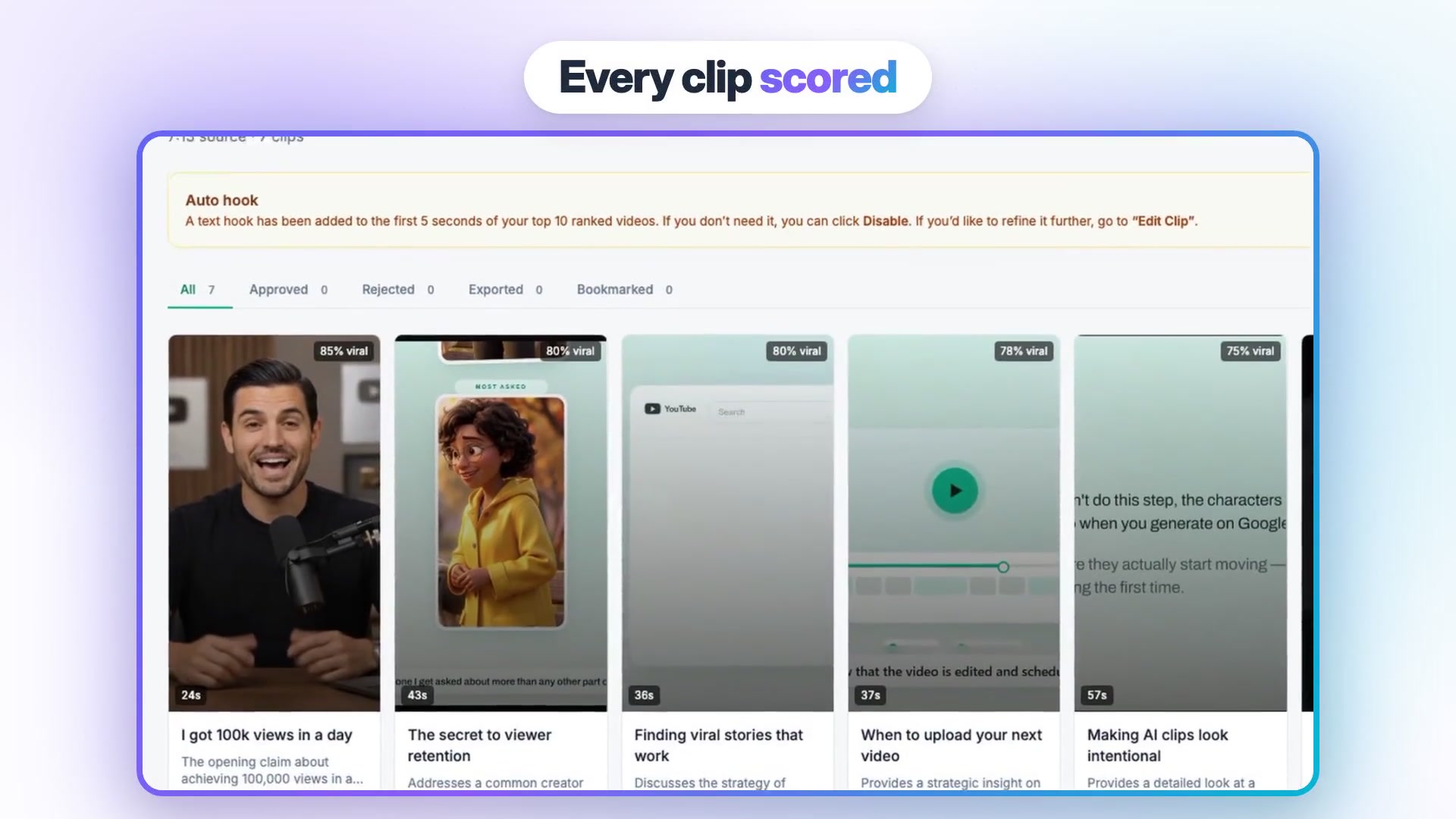
For highlights, AI Clips takes a recording of up to 2 hours on paid plans (10 minutes on Free), transcribes it and ranks the best moments. Each clip gets a virality score, a 0-100 number that compares that moment with the rest of the same recording, plus a 3-to-8-word hook and a one-sentence reason it was picked. You choose clip length (Auto, or ranges from 10-15 up to 90-180 seconds), every clip is captioned, and an optional face-tracking toggle (off by default) keeps the speaker in frame instead of using a plain center crop. Finding clips costs 1 credit per 10 minutes of source, and each exported clip costs 1 more; Vidpal's guide to repurposing long-form videos into Shorts walks through it.
Publishing is where it pulls ahead of Pictory. On Pro and Business, link your Instagram, TikTok, YouTube and LinkedIn accounts one time; after that each video can go out immediately or on a date up to 90 days away from the Vidpal scheduler, and publishing spends no credits. A Brand Kit (your saved logo, colors, font and caption style, applied to every render) keeps a blog's videos consistent. Vidpal's Pictory comparison page lists the feature differences.
2. Lumen5: best for brand-templated blog videos
Lumen5 is the closest like-for-like replacement for Pictory's article job. Its AI Script Composer turns a blog URL, PDF, pasted text or outline into a template-style video with stock media and AI voiceover.
- Best for: teams that want every article video to follow the same branded template.
- Price: Free (5 videos a month, 2-minute cap, 720p, Lumen5 outro); Basic $29/month or $19 yearly; Starter $79 or $59 yearly for 1080p and a brand kit; Pro $199 or $149 yearly.
- Watch out for: Free and Basic export at 720p, voice minutes come as a yearly pool, and no publishing appears on its pages.
Lumen5's blog-to-video feature page and pricing table show automated captions on all plans, 1,000+ AI voices on paid plans and one to three voice clones by tier. Basic's 240 AI voice minutes a year work out to 20 a month. Because 1080p starts at $79, crisp vertical Shorts cost more here than on Vidpal or Fliki.
3. Fliki: best budget pick for voiced article videos
Fliki converts ideas, scripts, blog posts and PowerPoint decks into narrated videos with stock or AI visuals. For a Pictory user, the appeal is a free plan, a lower entry price and a big voice catalog.
- Best for: bloggers on a budget, and anyone publishing in more than one language.
- Price: Free (3 credits a month, 720p, watermark); Standard $28/month or $21 yearly, 180 credits; Premium $88 or $66 yearly, 600 credits and API access.
- Watch out for: changing narration text re-charges that scene, and Fliki's FAQ and pricing card disagree on Premium's length cap (30 versus 40 minutes).
Fliki prices by unit, per its credits guide: 0.25 to 2 credits per minute of voiceover depending on the voice tier, and 0.1 credits per minute to export. Its FAQ says Standard's 180 credits yield roughly 60 to 90 minutes of finished video, two to three times Pictory Starter's 30 minutes for slightly less money. Standard also includes YouTube publishing and one voice clone, and 2,000+ voices span 80+ languages.
4. InVideo AI: best for agent-built drafts you keep editing
InVideo AI now pairs an agent with a multitrack editor: you describe the video, the agent assembles it from stock, uploads or models such as Seedance and Veo 3.1, and you refine it on a timeline.
- Best for: marketers who want generated footage and fine control in one place, or who work from ChatGPT, Claude or a CLI.
- Price: Starter $20/month or $10 yearly for 400 credits; Plus $60 or $30 yearly for 2,000; Max $250.
- Watch out for: generated clips are credit-hungry (Seedance 2.5 is about 56 credits per 5 seconds at 720p), and it neither posts nor schedules.
The InVideo article-to-video guide offers 16:9 or 9:16 at 30, 60 or 90 seconds, and notes that "invideo does not fetch web pages": the agent reads your post with its own browser or fetch tool. For highlight reels, InVideo's docs say it "does not score clips" for virality and picks moments by reading what you said. Exports and downloads cost no credits, and paid plans carry no watermark. Our guide to InVideo AI alternatives covers it in depth.
5. Descript: best for editing long recordings by transcript
Descript edits audio and video through the transcript: delete a sentence in the text and it disappears from the recording. If Pictory's long-video editor was your main tool, Descript is the deeper replacement for podcasts, webinars and interviews.
- Best for: podcasters and video teams who polish and clip long recordings with AI help, rather than in one click.
- Price: Free (60 media minutes a month, 720p); Hobbyist $24/month or $16 yearly; Creator $35 or $24 yearly with 4K; Business $65 or $50 yearly.
- Watch out for: no blog-URL input appears on its pricing or clips pages, and clip suggestions come without a numeric score.
Its "Create Clips" tool has the Underlord co-editor suggest moments, filler words go in one pass, and Studio Sound cleans audio. Per Descript's pricing page, Hobbyist includes 10 media hours and 400 AI credits a month. It publishes to YouTube, Wistia, HubSpot and podcast hosts, but no direct Instagram or TikTok posting appears on its pages.
6. VEED: best browser editor for subtitles and translation
VEED is a browser-based editor and generator with auto subtitles, translation and dubbing, AI voices, avatars and its own Fabric 1.0 talking-video model. It suits marketers who already have footage and need it subtitled, translated or trimmed.
- Best for: subtitle-heavy marketing videos and multilingual versions of existing footage.
- Price: Free (watermark, 720p, 10-minute exports); Creator $25/month or $12.25 yearly; Pro $45 or $22.08 yearly with 4K and translation into 50+ languages; Studio $79 or $38.75 yearly.
- Watch out for: it is download only; its help center says users must upload exported videos to other platforms manually.
Creator unlocks silence and filler-word removal, a clips tool, AI b-roll and unlimited export length, per VEED's pricing page; credits do not roll over. VEED is a stronger editor than Pictory but a weaker article-to-video tool, since no blog URL input appears on the pages we checked.
7. Synthesia: best for presenter-led training from scripts
Synthesia turns a script into a video read by a stock or personal AI avatar, and dubs existing videos. Choose it over Pictory when the video needs a presenter rather than stock footage, as in onboarding, product training or internal updates.
- Best for: training, HR and explainer teams publishing in many languages.
- Price: Free Basic (10 minutes a month, watermark, 9 stock avatars); Starter $19/month or $14 yearly for about 12 minutes a month; Pro $89 or $59 yearly for about 60 minutes.
- Watch out for: avatar footage costs about 100 credits per finished minute, and work pauses at your limit until renewal unless you buy more.
Synthesia's pricing page lists 140+ languages and voices on every plan and dubbing in 70+ languages. Its Syren agent builds videos from a chat prompt in 16:9 or 9:16, and an MCP server connects it to Claude and ChatGPT. For blog promotion it is overkill; for a course creator it can replace filming.
Worked example: a month of video from three posts and one webinar
A WordPress site that publishes three posts and one 30-minute webinar a month can turn all of it into video on Vidpal's Starter plan, using its published credit costs.
| Step | Vidpal feature | Credits |
|---|---|---|
| 3 blog posts, each turned into a 60-second Short | Studio, "From URL" | 3 |
| The best post turned into a 3-to-5-minute 16:9 explainer to embed in it | Studio, Long video | 5 |
| 30-minute webinar scanned for highlights | AI Clips (1 credit per 10 minutes) | 3 |
| The 4 highest-scoring clips exported with captions | AI Clips (1 credit per clip) | 4 |
| Total | Starter: 15 credits, $19 a month or $12 billed yearly | 15 |
Prices and credit costs from Vidpal's pricing page, checked 6 November 2026.
That is seven short clips and one long video for $19. On Starter, Vidpal copies each caption and opens the platform for you; on Pro ($39, 40 credits) you could double the output and schedule all of it. Pictory Starter's 30 minutes would cover the three Shorts and the explainer too, but you would upload every file by hand, and its pricing page shows no per-highlight credit cost.
To get the long version working for the original article:
- Record cleanly. Our roundup of free webinar recording tools is a good start; clear audio gives better transcripts.
- Write for scenes. Posts with short sections and one idea per heading convert best, so the habits in our rules of blog writing pay off twice.
- Embed the long video near the top of the post with a one-line summary above it, and lazy-load the player so it does not slow the page; our guide to WordPress speed optimization plugins covers lazy loading for YouTube embeds.
- Update the post's metadata. Mention the video in the meta description through your SEO plugin; our Yoast SEO walkthrough shows where.
- Point every Short back to the post in its caption.
Before you cancel Pictory: a short checklist
Pictory deletes projects when an account is cancelled and does not refund paid subscriptions, so plan the exit before you click cancel.
- Download every finished MP4 you might reuse, and export captions as .srt or .vtt files.
- Copy the scripts of your best videos into a document; they paste straight into Vidpal's "Full Script" input or Lumen5's composer.
- Cancel near the end of a billing period, since unused time is not refunded.
- If you relied on a cloned voice, note that Vidpal has none; Fliki, Lumen5 and Descript offer cloning.
- Run your next three posts through the new tool first.
Which Pictory alternative should you choose?
Start from the job you use Pictory for most.
- Promoting blog posts on Shorts, Reels and TikTok: Vidpal; Starter for a few posts a month, Pro if you want scheduling.
- Clipping webinars, podcasts or talks: Vidpal AI Clips for scored, captioned vertical clips, or Descript if you prefer to edit by transcript.
- Brand-templated article videos for a marketing team: Lumen5.
- Cheapest narrated videos, or several languages: Fliki.
- Generated footage with a real timeline: InVideo AI.
- Subtitling and translating footage you already have: VEED.
- A presenter on screen for training: Synthesia.
- 20-to-30-minute narrated videos from long scripts: stay with Pictory, which handles script and URL videos up to 30 minutes with a large stock library.
For a broader list of tools that start from written content, read our guide to the best AI tools to convert blog posts into videos. If you sell services or products locally, our small business AI video tools roundup ranks options by budget.
What to do next
Pick your most-read recent post and your latest recording, and make one Short from each. You can open a free Vidpal account to look around, but Studio and AI Clips exports need a paid plan, so one month of Starter at $19 is the honest test. Then compare it with your last Pictory export on watch time.
Frequently asked questions
What is the best alternative to Pictory?
Vidpal is the strongest overall Pictory alternative for bloggers and small businesses as of November 2026. It turns a script or a blog URL into a captioned Short, cuts scored highlight clips from recordings up to 2 hours long, and on Pro schedules posts to Instagram, TikTok, YouTube and LinkedIn. Lumen5 is the closest like-for-like option for templated article videos.
Is there a free alternative to Pictory?
Pictory itself has only a 14-day trial. Lumen5's free plan allows 5 videos a month up to 2 minutes at 720p with a Lumen5 outro, and Fliki's free plan gives 3 credits a month with a watermark. Vidpal's free plan is a trial of 4 one-time credits with a watermark, and its Studio exports need a paid plan.
Can AI turn a blog post into a video automatically?
Yes. Vidpal, Pictory, Lumen5, Fliki and InVideo AI all accept a blog post. In Vidpal you paste the post's URL into Studio's "From URL" input; it drafts a script you can edit, adds a voice, visuals and captions, and renders a 30-to-90-second vertical Short for one credit. A longer 16:9 version costs five credits.
Is Vidpal cheaper than Pictory?
For short videos, usually. Vidpal Starter is $19 a month for 15 videos, and Pro is $39 for 40, about $0.98 each. Pictory Starter is $29 a month for up to 30 minutes of video in total. Vidpal's 16:9 videos cost 5 credits and stop at 10 minutes, so for narrated videos longer than that, Pictory is the better fit.
Can Pictory post videos to YouTube or Instagram directly?
Not according to the pages checked on 6 November 2026. Pictory offers MP4 downloads and share links, and its help center describes downloading a video and then uploading it to YouTube yourself. Vidpal Pro, Fliki and Descript can publish to YouTube from inside the app, and Vidpal Pro also posts to Instagram, TikTok and LinkedIn.
Which Pictory alternative is best for turning webinars into clips?
Vidpal AI Clips is the most automated: upload a recording up to 2 hours long and it returns ranked vertical clips, each with a 0-100 score, a hook title and captions, for 1 credit per 10 minutes plus 1 per exported clip. Descript suits people who would rather edit the transcript themselves, and VEED offers a clips tool from its Creator plan.