Best AI Video Tools for Small Business Marketing
 Written By John Ravi14 min read

Short answer: As of November 2026, Vidpal is the best AI video maker for business owners who need a steady posting schedule: Auto Reels drafts captioned Reels from your topics, Studio and AI Editing cover promos and your own footage, and Pro ($39/month, 40 videos) schedules them to Instagram, TikTok, YouTube and LinkedIn. Choose Canva or CapCut for free do-it-yourself editing, HeyGen for AI presenters, and Predis.ai for ads.
- One Vidpal credit is one Reel, carousel or edited upload: about $0.98 each on Pro.
- $25 a month buys Vidpal Pro if you pay yearly ($276).
- Vidpal doesn't post to Facebook, Pinterest or X; Canva and Predis.ai do.
Most small businesses don't lack ideas for video. They lack the hours to film, edit, caption and post three times a week while running the shop. An AI video maker for business closes that gap: it writes the script, finds or generates the visuals, adds a voice and captions, and in the best cases publishes on a schedule, so a florist, a plumber or a two-person agency can show up on Reels and Shorts every week.
We went through each vendor's official pricing, product and support pages on 6 November 2026 and compared the tools by marketing job: social Reels and Shorts, product and explainer videos, ads, customer testimonials, local promos and Instagram carousels. Prices are in US dollars as listed that day. You'll also find a budget table for $0 to $100 a month and a 30-day posting plan you can copy.
AI video maker for business: the 8 tools compared
Each tool below is matched to the marketing job it handles best, with its entry price and how the video reaches your customers.
| Tool | Best marketing job | Price from (monthly / billed yearly) | Free plan | Inputs | Publishing |
|---|---|---|---|---|---|
| Vidpal | A steady flow of Reels, Shorts and carousels | $19 / $12 (Starter, 15 credits) | 4 one-time credits, watermark | Topic, script, URL, RSS feed, your own footage | Instagram, TikTok, YouTube, LinkedIn; schedule up to 90 days (Pro and Business) |
| Canva | Design-led promos and offers | $18 / $12 (Pro) | Yes, 1080p exports | Templates, uploads, prompts | Facebook, Instagram, X, TikTok, Pinterest, LinkedIn, Tumblr; scheduling on Pro |
| CapCut | Editing your own phone footage | $19.99 / $15 (Pro) | Yes, basic editing | Your footage, templates, prompts | Share to TikTok; no scheduler documented |
| Predis.ai | Ads and e-commerce product posts | $32 / $19 (Core) | No; 3-day trial with card | Idea, product URL or store catalog, blog | Facebook, Instagram, TikTok, YouTube Shorts, LinkedIn, X, Google Business Profile |
| HeyGen | AI presenter explainers | $29 / $24 (Creator) | 3 watermarked videos/month, 1 min each | Script or prompt, photo or footage for avatars | None found (download) |
| VEED | Testimonials and subtitled talking-head clips | $25 / $12.25 (Creator) | Yes: 720p, watermark | Your footage, recordings, prompts | Download only |
| InVideo AI | Prompt-to-video ads with generative clips | $20 / $10 (Starter) | Not clearly published | Prompt, script, footage, product URL and screenshots | Download only |
| Clipchamp | Free editing on Windows and Microsoft 365 | Free; Premium via Microsoft 365 Personal ($9.99) | Yes: 1080p, no watermark | Your footage, recordings, templates | Export to YouTube, TikTok, LinkedIn; no scheduling |
Prices and plan details taken from the official sites on 6 November 2026.
How we compared the tools
We judged each tool on the six video jobs a small business actually has, using only vendor pages and help docs:
- Social Reels and Shorts: how many finished vertical videos a month the plan delivers, with captions.
- Product and explainer videos: script help, visuals and length.
- Ads: product inputs, ad formats and commercial-use terms.
- Testimonials: cleaning up a customer's phone video with captions and trims.
- Local promos: fast, branded videos for an offer or event.
- Carousels: Instagram image posts from the same ideas.
Two more questions decided close calls: does the tool publish or schedule for you, and what does one finished video cost? Instagram's own 2026 Reels guide says Reels can run from 3 seconds to 3 minutes, and YouTube now treats vertical uploads of up to 3 minutes as Shorts, per YouTube Help, so every tool here was judged on short vertical output first.
The 8 best AI video tools for small business marketing
The order reflects how much of the weekly video workload each tool takes off a small team.
1. Vidpal: best overall for keeping a posting schedule
Vidpal is the tool that does the most of the job without you: it can find a story, write it, render it and post it. Its Auto Reels autopilot takes your topics as keywords or RSS feed URLs, pulls fresh stories from feeds, Hacker News and web search, writes a script, has a hook optimizer pick the strongest of several opening lines, and renders a 9:16 Reel with voiceover and captions. On Pro it runs twice a day, on Business three times, and with auto-publish on it posts by itself; Vidpal's AI Reels generator page walks through the setup.
- Best for: owners who want 4 to 10 short videos a week on Instagram, TikTok, YouTube and LinkedIn without hiring an editor.
- Price: Free has 4 one-time credits with a watermark. Starter $19/month (15 credits), Pro $39/month (40 credits, scheduling and auto-publish), Business $69/month (100 credits); yearly billing brings them to $12, $23 and $41 a month. See Vidpal's plans and credits.
- Watch out for: no talking avatars, no Facebook, Pinterest or X publishing, and AI visuals are stills with motion or stock clips rather than generated footage.
Everything else runs on the same credit pool. Studio turns a topic, a script or a web page into a 30 to 90 second vertical video, or a 1 to 10 minute 16:9 video for YouTube at 5 credits. AI Editing is for your own footage: upload a phone clip and Vidpal adds word-level captions, cuts silences and filler words, adds zooms and stock b-roll, and reframes 16:9 to 9:16. B-roll means supporting footage cut over the speaker. Image Posts turns the same stories into 1080x1350 Instagram carousels, also 1 credit each.
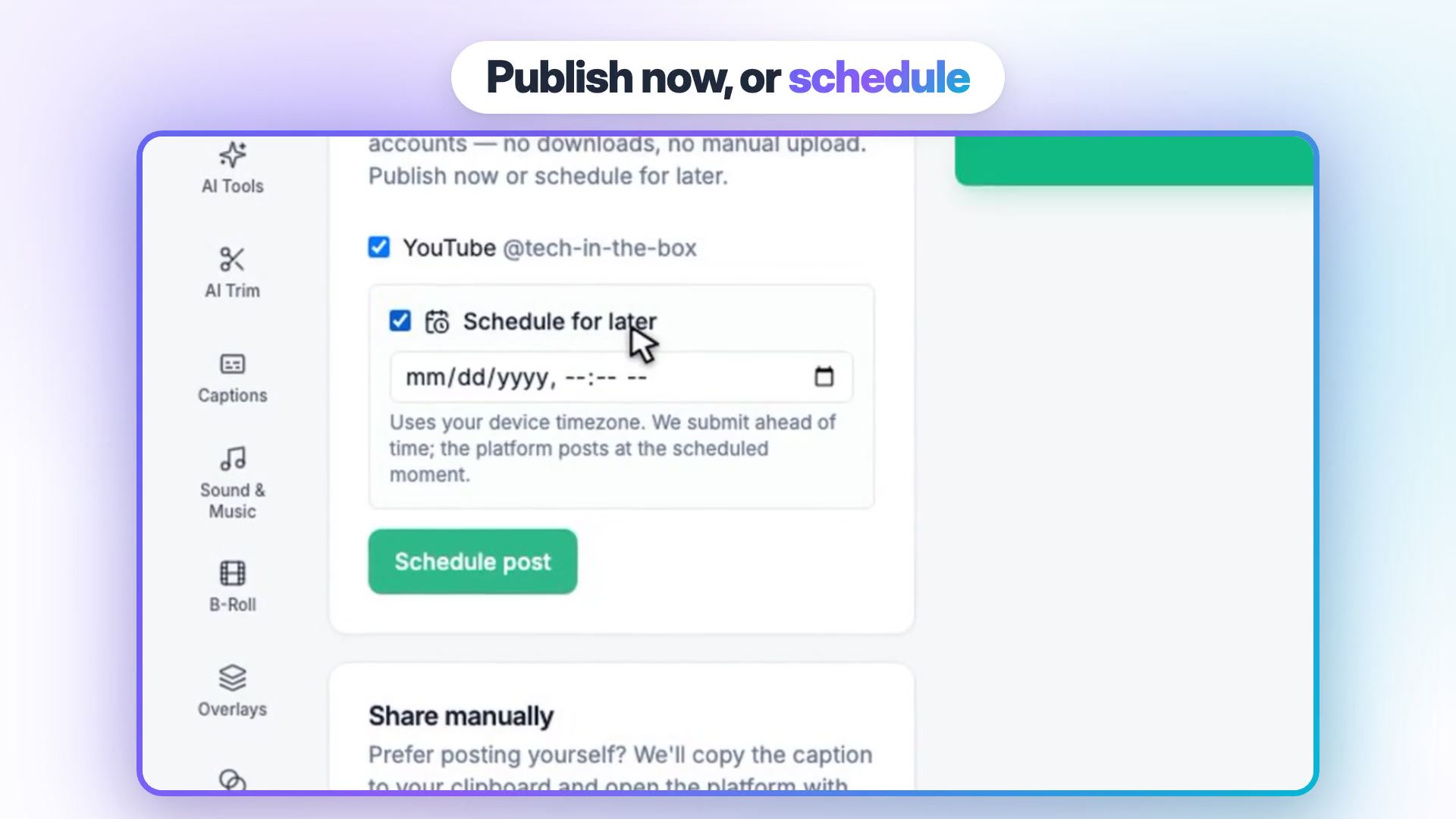
A Brand Kit stores your logo, colors, caption style and font, so every video carries the same look. From any video's Publish panel, Pro and Business publish now or schedule up to 90 days ahead, and publishing costs no credits. Starter shares manually, which works if you only post a few times a week. On Pro billed monthly a finished video costs about $0.98, the clearest per-video price in this list.
2. Canva: best for design-led promos and offers
If you already make flyers and menus in Canva, its video editor uses the same templates. You won't get a script written from your topic, but you get full control over every frame and direct sharing to seven social platforms.
- Best for: seasonal offers, event promos and anything that must match your printed materials.
- Price: Free; Pro $18/month or $144/year ($12/month); Business $25/month per person. See Canva's pricing.
- Watch out for: AI clips (Pro and up) are 16:9 and up to eight seconds, and Canva says you may not have exclusive rights to AI output.
The free plan exports MP4 files up to 30 minutes at 1920x1080 with no watermark unless you add Pro elements. Auto captions and AI Voice are built in, and Pro adds social scheduling and five brand kits. Canva shares to Facebook and Pinterest, which Vidpal can't, so the two pair well.
3. CapCut: best free editor for your own product footage
If you'd rather film products yourself, CapCut is a free editor for phone, desktop and web. Auto captions, text to speech and transcript-based editing that flags filler words are all there, plus a large template library.
- Best for: owners who film on their phone and want templates and captions.
- Price: Free; Pro $19.99/month or $179.99/year ($15/month). CapCut's pricing page notes prices are for reference and vary by region.
- Watch out for: commercial use. CapCut's Materials License Agreement says standard Sounds may not be used commercially, and an export that mixes non-commercial assets is for personal use only.
That license point matters for a business account: stick to your own audio or assets marked for commercial use. CapCut doesn't write scripts from a topic or schedule across platforms; it's an editor, and a good one.

4. Predis.ai: best for ads and e-commerce product posts
Predis.ai generates ads, short videos, carousels and single-image posts, then publishes them from a built-in calendar. For an online store it can start from a product URL or a Shopify, WooCommerce, Wix or Squarespace catalog.
- Best for: online shops that need a steady supply of product ads and posts.
- Price: Core $32/month ($19 billed yearly) with 1,300 credits, about 33 videos; Rise $79/month ($40 billed yearly) adds Auto Posting. See Predis.ai pricing.
- Watch out for: no free plan (the 3-day trial takes a card), and standard or UGC-style video uses 200 credits per 8 seconds.
It publishes to Facebook, Instagram, TikTok, YouTube Shorts, LinkedIn, X and Google Business Profile, which makes it useful for local businesses too. If you sell through WooCommerce, our WooCommerce SEO guide covers the product pages those ads will send people to.
5. HeyGen: best for AI presenter explainers
HeyGen makes talking-avatar videos: a stock or custom AI presenter reads your script on camera. That suits explainer and onboarding videos when nobody on the team wants to be filmed.
- Best for: service businesses explaining a process, and anyone who needs the same video in many languages (175+ on paid plans).
- Price: Free gives 3 watermarked one-minute videos a month; Creator is $29/month ($24 billed yearly) with 1080p exports; Pro $49/month ($41 billed yearly) adds 4K. See HeyGen's pricing.
- Watch out for: no social publishing was found, credit costs vary by model, and credits are lost on cancellation.
Synthesia is the training-focused alternative, with a Starter plan at $19/month ($14 billed yearly). For avatars, check platform rules: YouTube asks creators to disclose realistic altered or synthetic content.
6. VEED: best for customer testimonials and subtitles
VEED is a browser editor built around subtitles and cleanup, which is what a testimonial filmed on a customer's phone needs. Creator removes silences and filler words, adds AI b-roll and can correct eye contact.
- Best for: polishing talking-head clips and adding subtitles or translations.
- Price: Free exports 720p with a watermark; Creator $25/month ($12.25 billed yearly) at 1080p without one; Pro $45/month ($22.08 billed yearly) adds 4K and translation into 50+ languages.
- Watch out for: it's download only, so you upload to each platform yourself, and plans are billed per editor seat.
Vidpal's AI Editing covers the same testimonial job for 1 credit per upload and can then schedule the result, so choose VEED when you need its translation into 50+ languages and its dubbing allowance.
7. InVideo AI: best for prompt-to-video ads with generative clips
InVideo's agent builds a video from a prompt, a script or a product URL with screenshots, then you finish it on a timeline. Paid plans can mix in generative clips from models such as Veo 3.1, Kling and Seedance.
- Best for: ad concepts that need footage you can't film yourself.
- Price: Starter $20/month ($10 billed yearly) with 400 credits; Plus $60/month ($30 billed yearly) with 2,000 credits.
- Watch out for: one 5-second Seedance 2.5 clip at 1080p uses about 96 credits, and InVideo's docs say it "does not post or schedule".
Our roundup of InVideo AI alternatives covers cheaper routes if credit costs add up.
8. Clipchamp: best free editor on Windows
Microsoft's Clipchamp exports unlimited 1080p videos with no watermark on the free plan, and all its AI tools are free: auto subtitles in 80+ languages, 400 AI voices and an auto cut that removes pauses over 3 seconds.
- Best for: Windows and Microsoft 365 users who edit their own clips.
- Price: Free; Premium (4K, premium stock, a brand kit) comes with Microsoft 365 Personal at $9.99/month or Family at $12.99/month. See Clipchamp's plans.
- Watch out for: it's desktop-only since the iOS app was retired on 9 June 2026, and there is no scheduling.
Personal accounts can export straight to YouTube, TikTok and LinkedIn, which is enough for a business posting once or twice a week.
Which tool for which marketing job
Use this table when you know the job but not the tool.
| Marketing job | Best pick | Runner-up | Why |
|---|---|---|---|
| Social Reels and Shorts every week | Vidpal Pro | Predis.ai Rise | Scripts, captions and scheduled posting from one credit pool |
| Product and explainer videos | Vidpal Studio | HeyGen | Topic or script to finished video; HeyGen if you want a presenter |
| Ads | Predis.ai | InVideo AI | Product catalog inputs and ad formats |
| Customer testimonials | Vidpal AI Editing | VEED | Captions, silence and filler removal, reframing |
| Local business promos | Canva | CapCut | Templates that match your printed offers |
| Instagram carousels | Vidpal Image Posts | Canva | Carousels from the same stories as your Reels |
What $0, $25, $50 and $100 a month buys
A realistic budget table, built only from prices published on 6 November 2026. Yearly prices assume you pay for the year up front.
| Monthly budget | Monthly billing | If you pay yearly | What you get |
|---|---|---|---|
| $0 | Canva Free + CapCut or Clipchamp Free + Vidpal's 4 trial credits | Same | Unlimited hand editing of your own footage at 1080p; you script and post everything yourself |
| $25 | Vidpal Starter ($19) | Vidpal Pro ($23) | 15 watermark-free videos shared by hand, or 40 videos with scheduling and auto-publish on yearly Pro |
| $50 | Vidpal Pro ($39) + free Canva and CapCut | Vidpal Pro ($23) + Canva Pro ($12) + CapCut Pro ($15) | 40 videos a month on autopilot, plus pro templates, scheduling in Canva and a premium editor |
| $100 | Vidpal Business ($69) + Canva Pro ($18) | Vidpal Business ($41) + HeyGen Creator ($24) + Canva Pro ($12) + CapCut Pro ($15) | 100 videos a month, Auto Reels three times a day, and on yearly billing an AI presenter for explainers |
Prices and plan details taken from the official sites on 6 November 2026. CapCut says its displayed prices vary by region.
For most owners the $25 yearly row is the sweet spot: Pro at $276 a year covers 40 videos a month, more than the plan below needs. Treat video like any other marketing channel and weigh its cost against what you already spend on email marketing software or ads.
A 30-day posting plan for a small business
This plan posts five times a week, mixing AI-made Shorts, clips of your own footage and one carousel, and uses 24 of Vidpal Pro's 40 monthly credits, leaving room for retakes and Auto Reels picks. Take a florist as the example; swap in your own products.

- Days 1-2, set up. Add your Brand Kit, connect Instagram, TikTok, YouTube and LinkedIn, and enter three Auto Reels topics (for example "wedding flowers", "plant care", your city's events). Film ten 10 to 20 second phone clips: products, the shop, your hands at work.
- Week 1, introduce the business (5 credits). Three Studio Shorts on questions customers ask, one carousel "How to keep cut flowers fresh", and one AI Editing clip of you introducing the shop.
- Week 2, show the products (5 credits). Three AI Editing clips from your product footage with captions and zooms, one carousel price guide, one Studio explainer Short.
- Week 3, show proof (5 credits). Two customer testimonials (ask permission first), one before-and-after Reel, one FAQ carousel, one Auto Reel you approve from the queue.
- Week 4, make an offer (9 credits). One local promo Short for a seasonal offer, one 3-minute 16:9 YouTube video answering your most-searched question (5 credits), two Shorts and one carousel.
- Days 29-30, review. Check which posts got the most saves, shares and profile visits, and repeat those formats next month.
Schedule each week's posts in one sitting with Vidpal's Social Scheduler, and post Facebook versions from Canva or Predis.ai if Facebook matters to you. Keep expectations grounded: in Vidpal's own 38-Short test from 16 September to 5 October 2026, the median Short drew 36.5 views while one channel produced 81% of all 13,538 views. Packaging and niche decide results, so give a format a month before judging it. The YouTube video can also go into your blog post; our guide to the best AI tools to convert blog posts into videos shows how to embed it.
Which AI video tool should your business pick?
- If you want video to happen every week without filming: Vidpal Pro, ideally billed yearly at $23 a month.
- If you post a few times a week and can share by hand: Vidpal Starter at $19 a month.
- If your budget is $0: Canva Free plus Clipchamp or CapCut, and film everything yourself.
- If you run an online store: Predis.ai for product ads, alongside Vidpal for Reels.
- If nobody wants to be on camera but you need a presenter: HeyGen Creator.
- If Facebook and Pinterest are your main channels: Canva Pro for scheduling there.
- If you mostly fix up talking-head clips in other languages: VEED Pro.
If you're weighing script-to-video tools instead, our list of Pictory alternatives compares them for business use.
What to do next
Pick the budget row that fits, then copy week one of the plan. Sign up for Vidpal free to try Auto Reels on your own topics with the 4 trial credits, and upgrade once you like what it drafts. Video works best alongside search, so pair it with a solid small business SEO plan.
Frequently asked questions
What is the best AI video maker for a small business?
Vidpal is the best overall pick as of November 2026 for small businesses that want regular Reels, Shorts and carousels. Auto Reels drafts captioned videos from your topics, AI Editing polishes your own footage, and the Pro plan at $39 a month schedules 40 videos to Instagram, TikTok, YouTube and LinkedIn. Canva and CapCut are the best free editors.
How much should a small business spend on AI video tools?
For most small businesses, $0 to $50 a month is enough to start. At $0, Canva Free and Clipchamp or CapCut let you edit your own footage. At $19 to $25, Vidpal Starter, or Pro billed yearly at $23 a month, produces 15 to 40 finished videos. Spend more only for AI presenters or ads.
Can Vidpal post to Facebook?
No. As of November 2026, Vidpal publishes and schedules to Instagram, TikTok, YouTube and LinkedIn on the Pro and Business plans, but not to Facebook, Pinterest or X. If Facebook matters to your business, download the video and post it there, or schedule it with Canva Pro or Predis.ai, which both list Facebook.
Can I use CapCut for business marketing videos?
Yes, with care. CapCut's Materials License Agreement says standard Sounds may not be used commercially and that an export mixing non-commercial assets is for personal use only. For a business account, use your own music and footage or assets marked for commercial use, and check the license before running a video as an ad.
How often should a small business post short videos?
Pick a pace you can keep for months. Four short videos and one carousel a week is a practical start for a small team, and it uses about 24 credits a month on Vidpal Pro, including one longer YouTube video. Consistency matters more than volume, so review results after 30 days before adding more.
Do I have to label AI-generated marketing videos?
Sometimes. YouTube asks creators to disclose realistic altered or synthetic content, such as an AI person saying something, but not for AI-written scripts or captions. TikTok's guidelines require labels on realistic AI-generated scenes or people, and Instagram applies an "AI info" label when it detects AI signals or you disclose.